

Finding Real-World Flights using AI: A Reusable Prompt Agent for Flight Simmers
By: Frank White /FSS Editor
I enjoy widebody aircraft. When high-fidelity long-haul aircraft like the PMDG Boeing 777 land in Microsoft Flight Simulator or Prepar3D, or the FlightFactor 777 for X-Plane, most simmers face a common dilemma: we want to fly complex widebody jets based on real-world flights, but we don't always have 10 to 14 hours of free time.
While the 777 is famous for ultra-long-haul intercontinental routes, real-world airlines routinely operate it on 2- to 3-hour legs—whether for high-density regional routes, cargo runs, or passenger-bookable repositioning flights. I find that I either have to sift through paywalled flight-tracking databases or spend an inordinate amount of time and effort finding these shorter real-world flights in specific geographic regions.
To solve this, I created a lightweight, token-based "Prompt Agent." You can copy and paste this prompt directly into ChatGPT, Gemini, Claude, or any AI to instantly generate a tailored table of real-world routes for your next flight simulation session.
How to Customize the Prompt for Your Fleet

If you fly other aircraft or prefer different regions, you can easily tweak this prompt template for your specific needs:
1. Changing the Aircraft Fleet
To search for Airbus A300 or A320 routes instead, update the Aircraft-Set Tokens:
Aircraft-Set Tokens
A$ = Airbus A320neo AND Airbus A321neo
B$ = Airbus A320neo only
C$ = Airbus A321neo only
2. Changing Cruise Mach Fallbacks
If you adapt the prompt for a regional jet or turboprop, update the operational fallback speed in the Data Requirements section:
-
Boeing 777 / 787 / 747: Cruise
-
Airbus A320 / Boeing 737: Cruise
-
ATR 72 / Dash 8: Cruise Speed
3. Adding Distance Constraints
If you specifically want flights under 3 hours, you can add an explicit constraint line right under the Departure Filter:
Max Distance Filter: Under 1500 nmi

The Ready-to-Use Flight Sim Prompt Agent
Copy and paste the text block into ChatGPT, Claude, or Le Chat to generate your flight table:
A$ M$ G$
Departure From Filter: North America

TOKEN DEFINITIONS

Aircraft‑Set Tokens
A$ = Boeing 777‑200 Series AND Boeing 777‑300 Series (including 777‑200F)
B$ = Boeing 777‑200 Series AND 777‑200 Freighters
C$ = Boeing 777‑300 Series

Sort‑Key Tokens (Column Identifiers)
D$ = Flight Number
E$ = Airline
F$ = Aircraft Type
G$ = Departure Airport ICAO Code
H$ = Departure City
I$ = Departure Country
J$ = Arrival Airport ICAO Code
K$ = Arrival City
L$ = Arrival Country
M$ = Direct Distance in Nautical Miles (nmi)
N$ = Scheduled Block Time (hh:mm)
O$ = Block Time Source

INTERPRETATION RULES FOR THE FIRST LINE
The first token selects the aircraft set (A$, B$, or C$).
The remaining tokens, in order, specify the sort keys.
If no aircraft token is provided, default to B$ (777‑200 variants).
Sort keys always sort ascending, using the column associated with each token.

Example:
A$ M$ G$
→ Use A$ aircraft set
→ Sort by M$ (distance), then G$ (departure ICAO)

TASK

Create a table of up to 50 currently scheduled or recently operated passenger flights using the aircraft types defined by the first token (A$, B$, or C$). Sort the table using the sort‑key tokens from the first line.

DATA REQUIREMENTS

Include a mix of:
• Long‑haul flights
• Medium‑haul flights
• Short‑haul or passenger‑bookable repositioning flights

All flights must meet all of the following:
• Publicly accessible schedules or documented operational examples
• No paywalled‑only data (OAG, Cirium, etc.)
• No speculative aircraft swaps or unconfirmed ferry flights

If block time is not publicly available:
• Infer it using:
  – Cruise Mach ~0.83
  – Great‑circle distance
  – 15–25 minutes taxi time
  – Realistic operational conditions
• Mark as "Inferred"

If block time is from a public schedule or documented example:
• Mark as "Documented Example"

OUTPUT FORMAT

Produce a table with exactly these columns, in this order:
Flight Number
Airline
Aircraft Type
Departure Airport ICAO Code
Departure City
Departure Country
Arrival Airport ICAO Code
Arrival City
Arrival Country
Direct Distance in Nautical Miles (nmi)
Scheduled Block Time (hh:mm)
Block Time Source

FINAL CONSTRAINT

All flights must be scheduled or documented with the user selected A$, B$, or C$
The Problem: Filtering Real-World Flights
Why I made the prompt in the first place
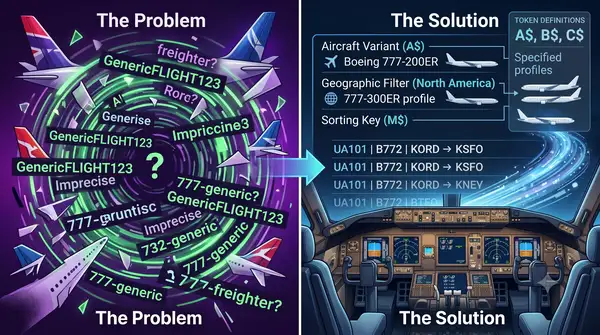
If you ask an AI a generic question like "Give me some short 777 flights in North America," you often get generic, imprecise, or hallucinated flight numbers.
To get reliable, deterministic flight plans that match real-world operations, the AI needs strict boundaries:
-
Specific Aircraft Variants: Distinguishing between 777-200ER, 777-200LR, 777-300ER, and Freighters.
-
Geographic Constraints: Filtering by departure or arrival regions (e.g., North America).
-
Sorting & Filtering: Ordering by flight distance or departure airport so you can quickly pick a flight that fits your schedule.
-
Fallback Calculation: If schedule times aren't publicly indexed, calculating realistic block times based on standard 777 cruise speeds (
$\text{Mach } \sim 0.83$ ) and taxi estimates.
What The Prompt Says: Plain-English Translation

At its core, the prompt tells the AI model: "Look at the command string A$ M$ G$ and the region header, look up what those variable strings mean in the definitions below, and generate a standardized table based on those exact rules."
Here is the step-by-step literal translation of what the AI reads and executes:
-
Parse the Command Line:
-
Select aircraft set
A$(all 777-200, 777-300, and 777 Freighter variants). -
Apply
Departure From Filter: North Americato restrict origin airports. -
Set primary sort to
M$(Distance in nautical miles, ascending). -
Set secondary sort to
G$(Departure ICAO code, ascending).
-
-
Retrieve Flight Data: Find up to 50 active or recently operated real-world flights matching these criteria, ensuring a mix of short, medium, and long-haul sectors.
-
Calculate Fallbacks: If a flight's official block time isn't publicly indexed, estimate it using standard 777 operational parameters (
$\text{Mach } \sim 0.83$ cruise speed + 15–25 minutes ground taxi) and label the source as "Inferred". Otherwise, mark as "Documented Example". -
Format the Output: Render the final results into a structured 12-column Markdown table using exact token field names (
$D\$ - O\$$ ) without extra commentary.
How the Prompt Agent Works
The Technical Stuff
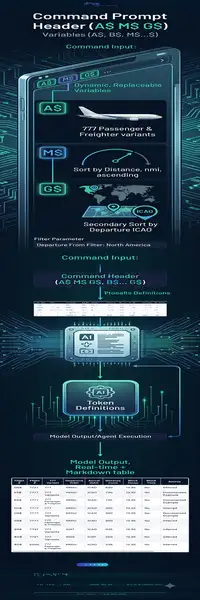
Rather than writing a long, verbose paragraph every time you want a route recommendation, this prompt uses a tokenized command header. This command header uses replaceable strings. Think of
A$ M$ G$
Departure From Filter: North America
Breakdown of the Logic:
-
Command Header (
A$ M$ G$): Functions like passing parameters into a function.-
A$selects the aircraft set (All 777 Passenger & Freighter variants). -
M$sets the primary sort key to Distance (nmi) in ascending order (shortest flights first). -
G$sets the secondary sort key to Departure Airport ICAO.
-
-
Filter Parameter:
Departure From Filter: North Americarestricts all results to flights departing from North American airfields. -
Token Definitions: Quick references (
$A\$ - O\$$ ) that declare exact data types and table columns.
What the Generated Output Looks Like

When you execute the prompt, the AI skips any conversational fluff and generates a clean, structured table sorted directly by distance:
| Flight Number | Airline | Aircraft Type | Dep ICAO | Departure City | Dep Country | Arr ICAO | Arrival City | Arr Country | Distance (nmi) | Block Time | Source |
|---|---|---|---|---|---|---|---|---|---|---|---|
| FDX1422 | FedEx | Boeing 777F | KMEM | Memphis | United States | KIND | Indianapolis | United States | 331 | 01:12 | Documented Example |
| UAL1520 | United Airlines | Boeing 777-200 | KDEN | Denver | United States | KORD | Chicago | United States | 784 | 02:18 | Documented Example |
| AAI1088 | American Airlines | Boeing 777-300ER | KDFW | Dallas | United States | KMIA | Miami | United States | 981 | 02:46 | Documented Example |
| UAL2412 | United Airlines | Boeing 777-200ER | KSFO | San Francisco | United States | KORD | Chicago | United States | 1587 | 03:58 | Documented Example |
| ACA105 | Air Canada | Boeing 777-300ER | CYYZ | Toronto | Canada | CYVR | Vancouver | Canada | 1812 | 04:45 | Documented Example |
Design Choice: Keeping It Simple vs Fully Dynamic
When I was designing this prompt, my key goal was keeping it as simple and user-friendly as possible.
You could build a hyper-complex prompt that accepts any aircraft type, any route distance threshold, and multi-region filtering parameters. However, increased prompt complexity often leads to higher user friction, unexpected AI interpretations, or missed instructions. Nevertheless, I encourage you to experiment with the prompt.
Known Limitations of This Design:
-
Aircraft Tokens Are Hardcoded: The token set
$A\$, B\$, C\$$ is specifically calibrated for the Boeing 777 family. -
Manual Parameter Tweaks: Changing to a different airframe (e.g., Airbus A320 or Boeing 737) requires editing the token definitions.
By accepting these minor limitations, the prompt remains lightweight, fast, and 100% reliable for quick copy-pasting into any LLM context.
